Modern games keep pushing graphics and hardware forward, but older consoles still influence how many people want their gaming setups to look and feel. If you play classic titles through PC ports or emulation, retro-styled peripherals can add some of the character missing from a standard keyboard and mouse. They also work with newer games that borrow pixel art, side-scrolling action and other ideas from earlier generations.
8BitDo Retro R8
The 8BitDo Retro R8 is a wireless gaming mouse styled after the Nintendo Entertainment System. Alternative versions borrow their appearance from the Commodore 64 and original Xbox. It supports Bluetooth, a wireless USB receiver and a wired USB connection. A charging dock keeps it ready between sessions, while companion software lets you remap buttons and adjust sensitivity. Its angular shape favors visual authenticity over comfort, so it may suit shorter gaming sessions better than a full workday.
PromoType KeyBoy Advance
The KeyBoy Advance turns the shape of Nintendo’s Game Boy Advance into a compact mechanical keyboard. It includes familiar details such as shoulder buttons, indicator lights and a speaker-style grille. This is a custom keyboard project rather than a complete ready-to-use product. You must supply the switches and keycaps yourself, making it better suited to experienced keyboard builders. The configurable shoulder buttons can also provide extra controls for games or desktop shortcuts.
8BitDo M30
The 8BitDo M30 recreates the six-button layout of the Sega Genesis controller. Its large directional pad and two rows of face buttons make it particularly useful for fighting games and Sega classics such as ‘Sonic the Hedgehog 2’, ‘Streets of Rage 2’ and ‘Phantasy Star IV’. It works with PCs, Nintendo Switch, macOS, Android devices, Steam Deck and Raspberry Pi systems. The compact button layout may feel crowded, but it offers a familiar option for players who grew up with Sega hardware.
Retro-Bit Wireless Tribute 64
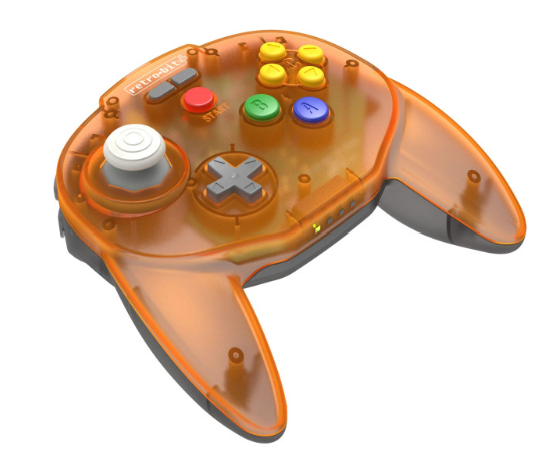
Nintendo 64 games were designed around one of the strangest controllers of the 1990s. The Retro-Bit Wireless Tribute 64 preserves its button placement while using a more conventional shape. It works with original Nintendo 64 hardware, PCs and Nintendo Switch. The controller is best suited to games such as ‘Super Mario 64’, ‘GoldenEye 007’, ‘Star Fox 64’ and ‘The Legend of Zelda: Ocarina of Time’, especially when you want controls closer to the original experience.
8BitDo Retro Mechanical Keyboard
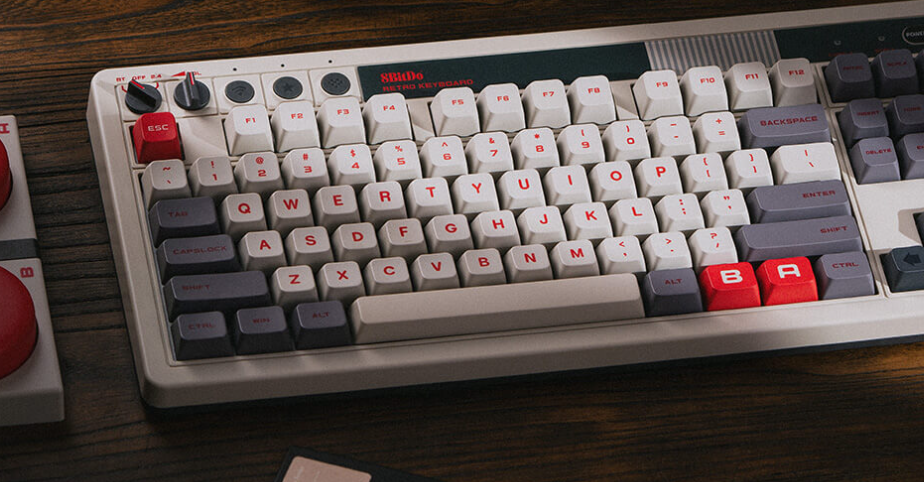
The 8BitDo Retro Mechanical Keyboard combines a modern typing experience with designs based on the NES, Japanese Famicom or Commodore 64. The NES version includes red A and B keys, along with two oversized external buttons that you can assign to custom commands. It connects through Bluetooth, a wireless USB receiver or a cable. You can also remap keys and create macros through 8BitDo’s software, making it useful for gaming as well as everyday computing.
Ayaneo Retro Mini PC AM02
The Ayaneo Retro Mini PC AM02 resembles a compact NES but contains hardware capable of running modern Windows applications and emulating older consoles. Its small case makes it easier to place beside a television or CRT monitor, while its processor, memory and solid-state storage provide enough performance for a large retro game library. A solid-state drive, or SSD, stores data on memory chips instead of a mechanical disk, providing faster loading and quieter operation.
8BitDo Arcade Stick
The 8BitDo Arcade Stick gives fighting games and arcade titles a full joystick and large-button control layout. Its gray, black and red design matches the NES-inspired appearance of several other 8BitDo products. You can connect it through USB-C, Bluetooth or a wireless receiver. Switch and PC modes automatically adjust the button assignments, while customizable macro buttons provide shortcuts for frequently used inputs. It works especially well with classic fighting games, beat ’em ups and arcade collections.
These gadgets will not reproduce every detail of the original hardware. They provide an easier way to bring classic designs and control layouts into a current PC setup. Choose the device that matches the games you actually play, whether that means a Genesis-style controller, an arcade stick or a complete miniature gaming computer.